TWINKLY APP
Smartphone App
TWINKLY APP
Smartphone App
TWINKLY APP
The heart of Twinkly
Full of unique features, our app gives you the power to apply and customize effects, design your very own, or draw them with your finger.
TWINKLY APP
The heart of Twinkly
Full of unique features, our app gives you the power to apply and customize effects, design your very own, or draw them with your finger.
-
CONTROL PANEL
Create the perfect ambience
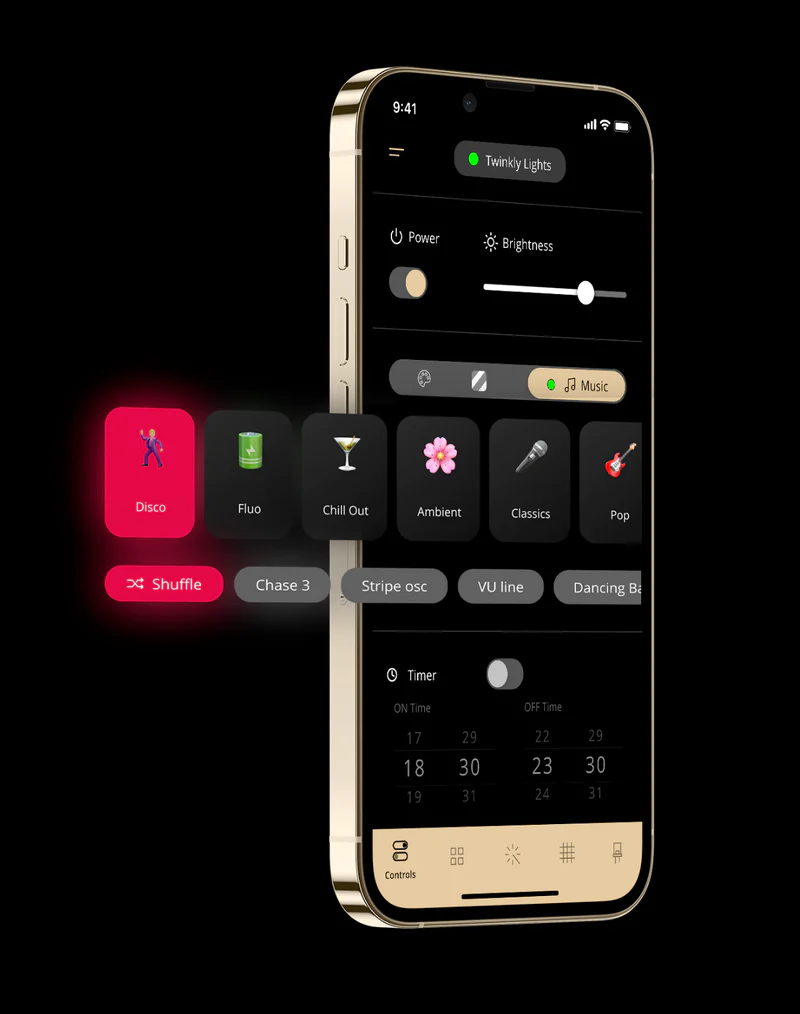
This is where you control all your lights. Check the status of your devices, apply colors and effects, create playlists, and sync up with Twinkly Music.
-
EFFECT GALLERY
Enjoy endless effects
Explore a huge number of effects in the Gallery on the app and tweak them to get them just right. And if you just can’t get enough effects, new ones are constantly being added to the Effects Store.


-
CONTROL PANEL
Create the perfect ambience
This is where you control all your lights. Check the status of your devices, apply colors and effects, create playlists, and sync up with Twinkly Music.
-
EFFECT GALLERY
Enjoy endless effects
Explore a huge number of effects in the Gallery on the app and tweak them to get them just right. And if you just can’t get enough effects, new ones are constantly being added to the Effects Store.

FX WIZARD Unleash your imagination
Create stunning effects in a matter of seconds thanks to this simple but powerful tool on the app. Just pinch, zoom, and rotate your lights on the screen and create unique effects and animations.
FX WIZARD Unleash your imagination
Create stunning effects in a matter of seconds thanks to this simple but powerful tool on the app. Just pinch, zoom, and rotate your lights on the screen and create unique effects and animations.
UNIQUE LAYOUT
Map your lights
Our one-of-a-kind mapping feature is what gives your lights their magic. Just point your phone’s camera at your lights, and the app does the rest.
UNIQUE LAYOUT
Map your lights
Our one-of-a-kind mapping feature is what gives your lights their magic. Just point your phone’s camera at your lights, and the app does the rest.
-
DEVICE LIST
Arrange your lights virtually
Sometimes, some devices might be hidden from the eye of the camera. Or it’s just not feasible to map the entire room. In these cases, you can choose to create your scene manually by dragging, zooming and rotating your devices to match real life setup.
-
GROUP DEVICES
All your lights in one place
Have more than one Twinkly device? Manage them all from the Device section of the app, sync them up, check whether they’re on or off, and change effects.


-
DEVICE LIST
Arrange your lights virtually
Sometimes, some devices might be hidden from the eye of the camera. Or it’s just not feasible to map the entire room. In these cases, you can choose to create your scene manually by dragging, zooming and rotating your devices to match real life setup.
-
GROUP DEVICES
All your lights in one place
Have more than one Twinkly device? Manage them all from the Device section of the app, sync them up, check whether they’re on or off, and change effects.

TWINKLY MUSIC make your lights dance
Level up your lighting decorations with Twinkly Music.
A smart mic and cutting-edge algorithms interpret ambient sounds and music in real time, whether you’re listening to classical music, techno, or a live gig.


TWINKLY MUSIC make your lights dance
Level up your lighting decorations with Twinkly Music.
A smart mic and cutting-edge algorithms interpret ambient sounds and music in real time, whether you’re listening to classical music, techno, or a live gig.